
A copier lease gives a business access to printing and copying equipment without paying the full purchase price upfront. Instead of treating a copier as a major capital expense, leasing spreads the cost into predictable payments and often pairs the equipment with service, supplies, and support. For many offices, the real benefit is not just the machine itself, but the flexibility to manage cash flow, reduce maintenance headaches, and keep pace with changing print needs.
Is a copier lease better than buying?
A copier lease can be better than buying when your business wants predictable monthly costs, newer technology, and less responsibility for long-term equipment ownership. Buying may make sense if you plan to keep the same machine for many years and can handle repairs, supplies, and depreciation internally. Leasing is often more practical when print volume changes, technology matters, or preserving cash is a priority. The best choice depends on how your office actually works. A small firm with modest printing needs may not want to tie up cash in a large device that could become outdated. A busy department that relies on scanning, secure printing, finishing, and color output may value having an office printer lease that includes service and a path to upgrades.

Why businesses choose leasing over ownership
The appeal of a copy machine lease is simple: it turns a large equipment decision into a manageable operating expense. That can be especially helpful for startups, growing teams, nonprofits, seasonal businesses, and offices that need dependable output but do not want to manage every repair call separately. Leasing also helps businesses avoid the “buy once and hope” problem. Printers and copiers are work tools, and office needs can change quickly. A business may add staff, shift to hybrid work, bring more printing in-house, or require better scanning and document security. With the right copier lease, you can choose equipment that fits today’s workload while keeping future flexibility in mind. Common benefits include:
- Lower upfront cost: Leasing reduces the need for a large initial purchase and can preserve cash for payroll, marketing, inventory, or other priorities.
- Predictable budgeting: Monthly payments make it easier to forecast expenses, especially when maintenance and supplies are bundled.
- Access to newer technology: Leasing can make higher-quality equipment more attainable than buying outright.
- Simpler service management: Many lease agreements include repairs, routine maintenance, and toner, reducing the burden on office staff.
- Upgrade flexibility: At the end of the term, businesses may be able to return, replace, or upgrade the equipment instead of being stuck with aging hardware.
A printer lease is not automatically cheaper in every situation, but it can reduce operational friction. For teams that depend on reliable printing every day, fewer disruptions may be worth as much as the financial flexibility.
Leasing, renting, and buying are not the same
The terms often get used together, but a copier lease, copier rental, and purchase serve different needs. Understanding the distinction helps you avoid signing an agreement that does not match your timeline. A lease is usually a longer-term agreement, often structured over 12 to 60 months. It is designed for businesses that need a copier or multifunction printer as part of regular operations. A rental of photocopier equipment is typically shorter term and may be used for events, temporary offices, tax season, construction trailers, or overflow projects. Buying is straightforward ownership, but it also places the full responsibility for repairs, supplies, and eventual replacement on the business. Here is a practical way to compare them:
|
Option |
Best for |
Main advantage |
Main caution |
|---|---|---|---|
|
|
Ongoing office use |
Predictable payments and service options |
Contract terms require careful review |
|
|
Short-term or temporary needs |
Flexibility without a long commitment |
Monthly cost may be higher for extended use |
|
Purchase |
Long-term use with stable needs |
Full ownership and control |
Higher upfront cost and repair responsibility |
If you only need equipment for a few weeks or months, copy machine rental may be more sensible than leasing. If you need a dependable office machine for daily work, an office printer lease usually provides a more stable and cost-effective structure.
How do copier lease types work?
The two common lease structures are Fair Market Value leases and $1 buyout leases. A Fair Market Value lease typically has lower monthly payments and gives you options at the end of the term, while a $1 buyout lease usually has higher payments and lets you own the equipment when the lease ends. With a Fair Market Value lease, you are essentially paying to use the copier during the agreement. At the end, you may be able to return it, upgrade to a newer model, or buy it for its market value. This structure often fits businesses that want current technology and expect their printing needs to evolve. With a $1 buyout lease, the agreement is closer to financing a purchase. Payments are higher because the goal is ownership. At the end of the term, you can typically buy the equipment for a nominal amount. This may work well when your business wants to keep the same machine long-term and expects the equipment to remain useful after the lease. Neither option is universally better. The right choice depends on whether you value lower payments and upgrade flexibility or eventual ownership.
The real cost is more than the monthly payment
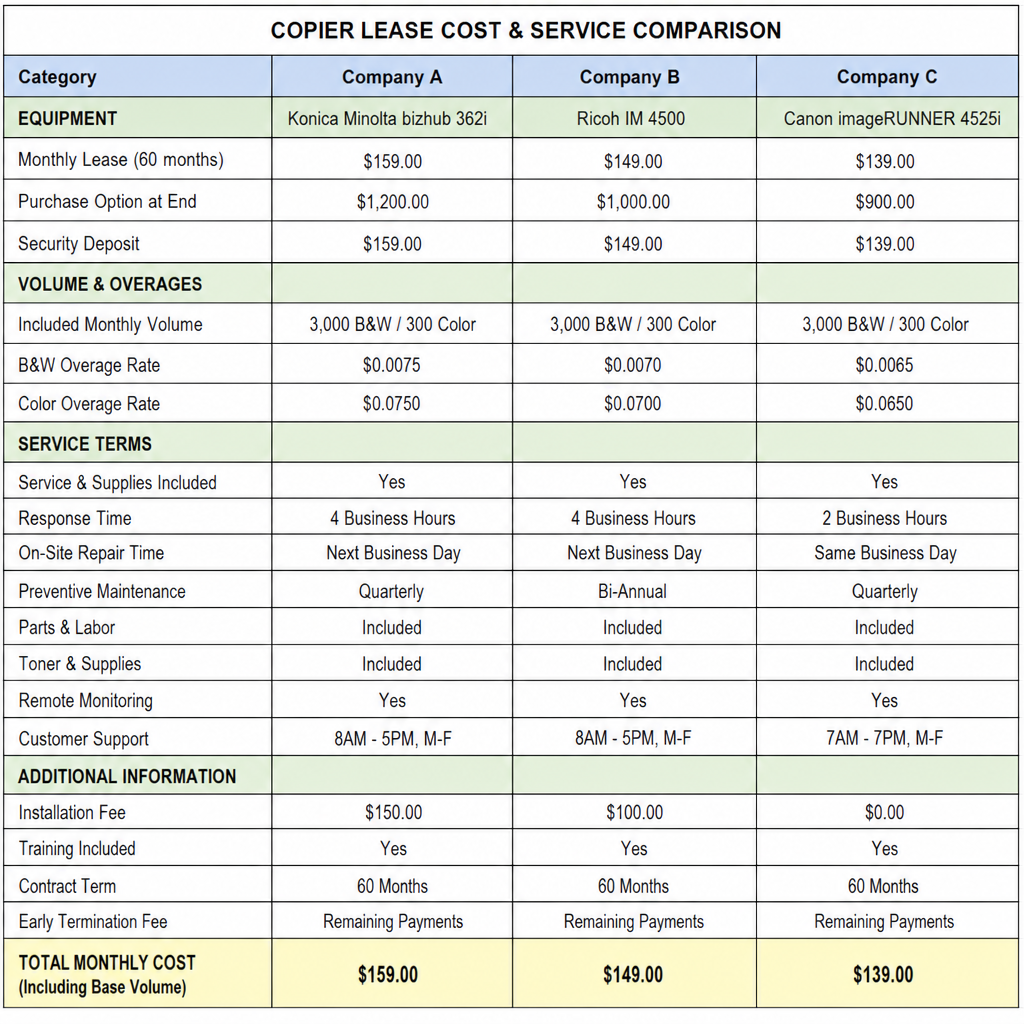
A low monthly quote can look attractive, but the real cost of a copy machine lease includes more than the base payment. Before comparing offers, ask what is included, what is billed separately, and what happens if your usage changes. Important cost factors include:
- Lease term length Longer terms usually reduce the monthly payment, but they may increase the total amount paid over time. A five-year agreement can be comfortable for budgeting, but it may not be ideal if your business is growing quickly or your technology needs are changing.
- Service and maintenance Repairs, labor, parts, and preventive maintenance may be included, partially included, or billed separately. A cheaper lease without strong service support can become expensive if downtime affects your team.
- Toner and supplies Some agreements include toner, while others require separate purchases. Clarify whether staples, drums, waste containers, and specialty supplies are covered.
- Print volume and overages Many agreements are based on estimated monthly pages. If your team prints more than expected, overage charges can add up. If you print far less, you may be paying for capacity you do not use.
- Insurance and fees Some contracts require equipment insurance or include documentation, delivery, installation, network setup, or end-of-lease fees. These details should be visible before you sign.
- Early termination penalties A copier lease is a contract. Ending it early may trigger substantial charges, so the term should match your realistic business outlook.
When reviewing costs, calculate the total cost of ownership or use. Include lease payments, service, supplies, taxes, insurance, potential overages, and return or upgrade costs. That broader view gives you a more accurate comparison than monthly payment alone.
Match the equipment to your actual workflow
One of the easiest ways to overpay is to lease a machine with features your team rarely uses. Another mistake is choosing a device that is too small, then dealing with slow output, frequent service calls, or frustrated employees. The best copier lease starts with a realistic look at your daily workflow. Consider these questions before choosing equipment:
- How many pages does your office print and copy in an average month?
- Do you need color printing, or is black-and-white enough for most work?
- How important are scanning speed, duplex scanning, and document routing?
- Do you need finishing features such as stapling, hole punching, or booklet making?
- Will multiple departments use the same machine?
- Do you print sensitive documents that require user authentication or secure release?
- Are your print needs steady, seasonal, or tied to specific projects?
A law office, accounting firm, medical practice, construction company, and school may all need a copier, but not the same copier. Some teams need fast scanning and secure document handling. Others need durable high-volume black-and-white output. A business with seasonal spikes may need a lease or service plan that accounts for changing page volume.
What should you check before signing?
Before signing a copier lease, check the full contract, not just the proposal page. The most important details are the term length, payment schedule, included services, page allowances, overage rates, renewal rules, end-of-lease requirements, and cancellation penalties. Pay special attention to automatic renewal language. Some agreements renew unless you provide written notice during a specific window. Missing that window can extend the contract longer than expected. Also confirm who owns the relationship: the equipment provider, the service company, or a third-party financing company. If different parties are involved, make sure you know whom to contact for billing, service, supplies, and end-of-term decisions. Use this checklist during review:
- Confirm the exact equipment model and accessories.
- Ask whether delivery, installation, and network setup are included.
- Verify maintenance response expectations and service coverage.
- Review toner and supply terms in plain language.
- Compare included monthly pages with real usage history.
- Identify overage rates for black-and-white and color pages.
- Look for annual payment increases or administrative fees.
- Understand what happens if the machine is damaged.
- Confirm return shipping, pickup, or buyout obligations.
- Calendar the notice period for renewal, return, or upgrade decisions.
If a term is unclear, ask for it in writing. A reputable provider should be willing to explain the agreement before you commit.
Tax and accounting considerations deserve a closer look
Leasing and buying can be treated differently for accounting and tax purposes. Lease payments are often handled as operating expenses, while purchased equipment may involve depreciation. However, the exact treatment depends on the lease structure, current rules, and your business circumstances. Because tax rules can change and every business is different, it is smart to ask your accountant before choosing between a copier lease and a purchase. The goal is not only to reduce taxes, but to choose the structure that supports cash flow, reporting, and long-term planning.
When renting is the smarter short-term choice
A copier rental can be the better option when the need is temporary, uncertain, or project-based. For example, a company opening a temporary field office may need dependable printing for six months but not beyond that. An event team may need high-volume copying for a conference. A tax preparation office may need extra capacity during peak season. In these cases, the rental of photocopier equipment gives access without a long contract. It may cost more per month than a lease, but that can still be cheaper than carrying equipment after the need disappears. The key is matching commitment length to actual use.
A practical path to the right decision
Choosing between a copier lease, printer lease, purchase, or rental does not have to be complicated. Start with your workflow, then compare financial structure, service support, and flexibility. A useful decision process looks like this:
- Measure current usage. Review page counts, color usage, scanning needs, and peak periods.
- Define must-have features. Separate essential functions from nice-to-have upgrades.
- Choose the right commitment. Use rental for short-term needs, leasing for ongoing flexibility, and buying for long-term ownership.
- Compare total cost. Include supplies, service, fees, insurance, overages, and end-of-term costs.
- Read the contract carefully. Watch for renewal rules, penalties, and unclear service obligations.
- Plan for the end date. Decide early whether you are likely to return, upgrade, or keep the equipment.
The best agreement is the one that supports your business without locking you into more machine, more term, or more cost than you need.
Final takeaway
Copier leasing can be a smart way to control costs, preserve cash, and keep office printing reliable without taking on the full burden of ownership. It works best when the lease term, equipment, service plan, and page volume match the way your team actually operates. Before signing, look beyond the monthly payment. Compare lease types, understand the fine print, and consider whether a copy machine lease, office printer lease, copier rental, or purchase truly fits your timeline. A clear decision now can prevent expensive surprises later and keep your office running smoothly.